
AU · gst
How to add and remove Australian GST: exclusive and inclusive prices
An exclusive price needs GST added; an inclusive price already contains it. Keep the starting amount, treatment and rounding scope separate when checking one ordinary Australian supply.
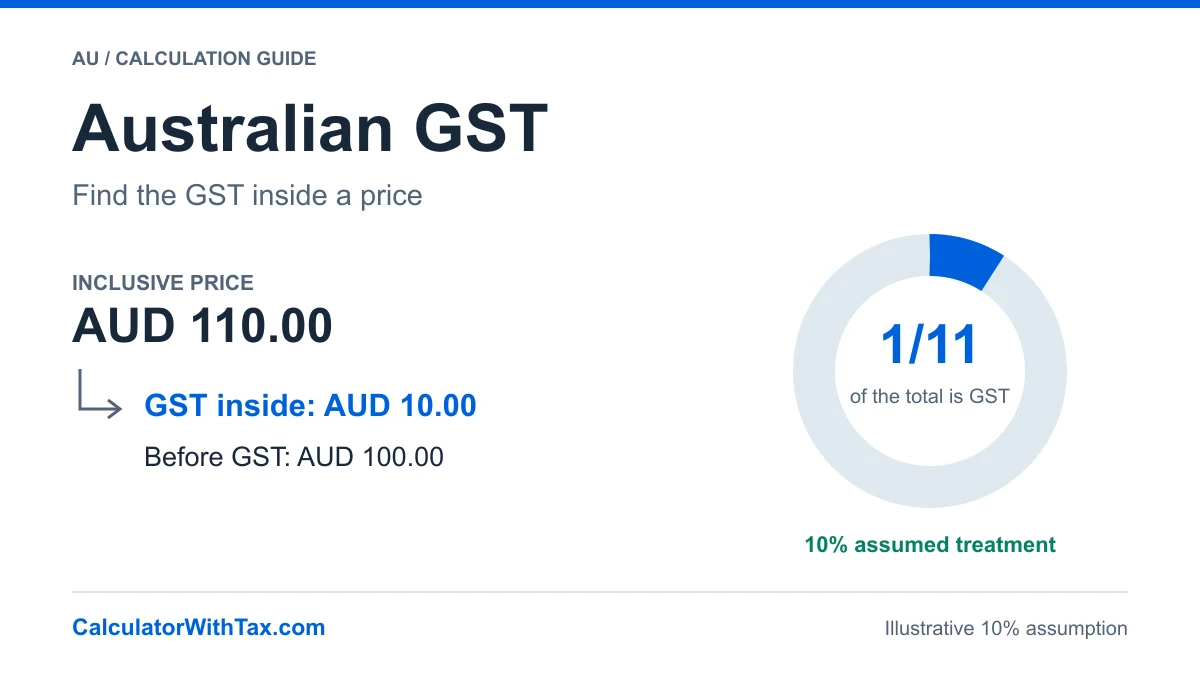
AUD · Illustrative 10% assumption
See the GST calculation
One amount, assumed 10% treatment. This example does not determine the rate applicable to your transaction.
- Before GST
- AUD 100.00
- GST amount
- AUD 10.00
- Including GST
- AUD 110.00
AUD 100.00 + AUD 10.00 = AUD 110.00
GST is rounded first to cents, exact half-cents up. The chart shows shares of the total, not the percentage applied to the before-tax amount.
Establish the starting price
An exclusive amount is before GST. An inclusive total already contains the tax. The Australian GST calculator starts with no treatment selected: a currency choice cannot decide whether your sale is taxable.
This guide assumes one ordinary monetary supply in AUD whose treatment has already been established. It does not decide registration, classify products or establish a taxable base.
Add GST to an exclusive amount
Under the ordinary 10% reference, calculate one-tenth of the exclusive amount as GST. Apply the stated cent-rounding policy to that component, then add it to the starting amount.
GST = round(exclusive × 10 ÷ 100)
Inclusive = exclusive + GST
The reference and its scope are grounded in GST Act sections 9-70 and 9-75. The table’s ordinary taxable assumption is not a recommendation for every sale.
Extract GST from an inclusive total
At that reference, the included GST is one-eleventh of the total, not 10% of the total. Round GST first, then subtract it to obtain the exclusive value.
GST = round(inclusive ÷ 11)
Exclusive = inclusive − GST
For example, directly subtracting 10% from AUD 110 would give AUD 99, whereas the synthetic example below reconciles AUD 100 exclusive, AUD 10 GST and AUD 110 inclusive.
Worked examples from the Australian engine
GST rounded first to cents, half-cents up; one ordinary taxable supply not split into items. Each row uses this country's calculator engine. The percentages are explicit example assumptions, not a determination of treatment.
| Case and evidence | Input / mode / rate | Excluding GST | GST | Including GST |
|---|---|---|---|---|
| Add GSTSynthetic arithmetic, assumed ordinary taxable supply | AUD 100.00Add · 10% | AUD 100.00 | AUD 10.00 | AUD 110.00 |
| Extract included GSTSynthetic reverse arithmetic | AUD 110.00Remove · 10% | AUD 100.00 | AUD 10.00 | AUD 110.00 |
| Statutory price exampleIndependent GST Act section 9-75 example; not vehicle-tax advice | AUD 22,000.00Remove · 10% | AUD 20,000.00 | AUD 2,000.00 | AUD 22,000.00 |
| Half-cent boundarySynthetic single-supply rounding check | AUD 0.05Add · 10% | AUD 0.05 | AUD 0.01 | AUD 0.06 |
The AUD 22,000 inclusive row reproduces the independent example in section 9-75. It is not a general vehicle-tax calculator or advice about luxury-car treatment. The other rows are synthetic arithmetic checks.
Keep the rounding scope narrow
The calculator uses nearest-cent, half-cent-up rounding for GST on one ordinary taxable supply not split into items. Section 9-90 treats single supplies, multiple supplies and divided items separately; the latter cases are not implemented here.
The ATO guide, page 31 provides operational rounding guidance. This one-amount tool does not promise invoice compliance, cash rounding, GST credits or BAS preparation. The generic manual tool can differ at reverse-rounding boundaries.
Taxable is not the same as GST-free or input-taxed
The ATO sales guidance is a source for checking classifications, not a classification service built into this calculator. Confirmed GST-free arithmetic adds no GST; it does not decide credit entitlement. Input-taxed and outside-scope choices deliberately return no calculation.
Mixed baskets, split items, special schemes, imports, exports, discounts and credit adjustments require separate treatment. Do not use a manual percentage to imply those cases are supported.
Check the starting amount and treatment
Before using a result, confirm that your amount includes or excludes GST as intended and that the supply fits the selected treatment. Reconcile the exclusive amount plus GST with the inclusive total. A calculator with tax explains those amounts; it does not establish registration status or a GST-credit entitlement.
For mixed sales, several supplies or an invoice split into items, check the relevant rules rather than applying a single percentage to the entire invoice. Seek appropriately qualified advice where treatment is uncertain.
Official sources and further reading
Use the Australian GST calculator, consult the source register and read the methodology limits.
The Federal Register’s current GST Act entry identifies the available compilation. Its publication notes distinguish the compiled text from uncommenced amendments, modifications and application provisions. Consult those materials when checking a real transaction; this guide does not resolve their applicability for you.
Frequently asked questions
How do I add GST to an Australian price?
For one ordinary supply already confirmed as taxable at 10%, calculate one-tenth of the exclusive price as GST, apply the stated cent-rounding policy and add it. An assumed AUD 100 exclusive becomes AUD 110 including AUD 10 GST.
Why is GST one-eleventh of an inclusive total?
At 10% of the exclusive value, the inclusive price has eleven equal parts: ten parts exclusive value and one part GST. Dividing the inclusive total by eleven finds its unrounded GST component.
Are GST-free and input-taxed sales interchangeable?
No. They have different treatment and GST-credit implications. The calculator does not classify a sale or establish credit eligibility; its input-taxed choice deliberately returns no calculation.
Can I calculate a mixed invoice with one percentage?
Not reliably. Taxable and non-taxable parts, multiple supplies and split items require separate consideration. This tool covers one ordinary taxable supply not split into items.
Use the same country engine
Add tax or extract the included amount with the calculation method used in these examples. Select the treatment applicable to your transaction separately.
Australia GST calculator