
GB · reverse-tax
How to add and remove UK VAT: net, VAT and gross
Start with an amount before VAT to add tax, or a VAT-inclusive total to extract it. Confirm the applicable treatment separately; this guide explains arithmetic, not transaction eligibility.
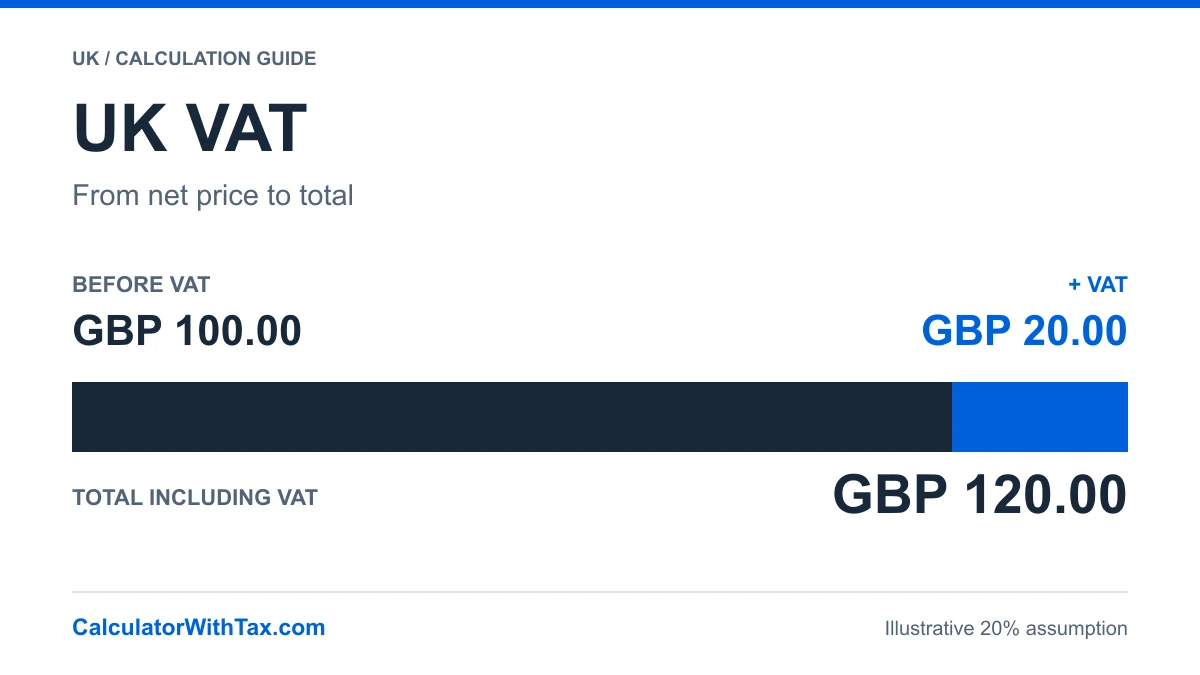
GBP · Illustrative 20% assumption
See the VAT calculation
One amount, assumed 20% treatment. This example does not determine the rate applicable to your transaction.
- Before VAT
- GBP 100.00
- VAT amount
- GBP 20.00
- Including VAT
- GBP 120.00
GBP 100.00 + GBP 20.00 = GBP 120.00
VAT is rounded first to pennies, exact half-pennies up. The chart shows shares of the total, not the percentage applied to the before-tax amount.
Choose the starting amount
Net means the amount before VAT. Gross means the total including VAT. The VAT amount is the difference between them. First establish which amount you have, then confirm the tax treatment independently.
The UK VAT calculator has separate add and remove modes. Its rate selector starts blank: choosing the United Kingdom does not tell the tool which treatment applies to a supply.
Add VAT to a net amount
For a simple proportional calculation, multiply the net amount by the percentage divided by 100. Round that VAT component according to the stated policy, then add it to the net amount.
VAT = round(net × rate ÷ 100)
Gross = net + VAT
For the explicit 20% assumption in the table below, a net amount of £100 produces £20 VAT and £120 gross. This is a synthetic arithmetic example, not a statement that a particular purchase is standard-rated.
Extract VAT from an inclusive total
When VAT is already inside the total, calculate its fraction of that total. Under this calculator’s VAT-first rounding convention:
VAT = round(gross × rate ÷ (100 + rate))
Net = gross − VAT
Subtracting 20% directly from an inclusive £120 would give £96, not the £100 net amount in the example. The percentage was applied to the net price, not to the larger inclusive total.
Worked examples from the calculator
All rows use the same VAT-first decimal engine as the UK VAT calculator. The 20% reference is an explicit example assumption, not a product classification or a recommended rate for your transaction.
| Case and evidence | Input | Net | VAT | Gross |
|---|---|---|---|---|
| Add VATSynthetic arithmetic example | £100.00 | £100.00 | £20.00 | £120.00 |
| Extract included VATSynthetic arithmetic example | £120.00 | £100.00 | £20.00 | £120.00 |
| HMRC inclusive exampleIndependent Notice 700 section 7.3.1 example | £2.40 | £2.00 | £0.40 | £2.40 |
| Half-penny boundarySynthetic test of the stated rounding policy | £0.03 | £0.02 | £0.01 | £0.03 |
HMRC Notice 700, section 7.3.1 supplies the independent £2.40 inclusive example: at 20%, the included VAT is £0.40. The other rows are synthetic checks, including a deliberate half-penny boundary. None decides tax eligibility.
Understand the rounding boundary
The UK calculator rounds the VAT component to pennies, exact half-pennies up, then derives the other amount so the parts reconcile. At the synthetic £0.03 inclusive boundary, unrounded VAT is £0.005; this convention displays £0.01 VAT and £0.02 net.
VATREC12030 describes nearest-penny rounding and also acknowledges alternative methods. Notice 700 sections 17.5–17.6 cover circumstances and concessions that this single-amount tool does not implement. Do not treat the displayed convention as universal invoice compliance.
The global manual calculator and formula generator round the reverse calculation differently at some midpoint boundaries. These examples intentionally use the UK engine, not the generic manual engine.
Confirm the treatment outside the arithmetic
The official rates overview and goods-and-services conditions are starting points for checking scope. A source link alone does not establish which rate applies to your transaction. Zero-rated, exempt and outside-scope selections must not be treated as interchangeable.
This guide excludes registration advice, tax-point decisions, mixed baskets, multi-line invoices, credit notes, discounts, special schemes, cross-border treatment and return preparation. “Reverse VAT” here means extracting an included amount; it is not advice about reverse-charge obligations.
Check your result before using it
Confirm whether your starting price includes VAT, select the applicable treatment and compare the net amount plus VAT with the inclusive total. Keep the selected treatment separate from product eligibility: a calculator with tax can explain the arithmetic without deciding your tax obligations.
If your transaction involves different rates or several invoice lines, do not combine them into one amount and assume the same result. Ask an appropriately qualified adviser when treatment or invoice requirements are uncertain.
Official sources and further reading
Use the UK VAT calculator for the worked calculation, consult the UK source register and read the calculation limitations.
The VAT rates overview and VAT Act section 2, section 29A and section 30 provide reference context. Conditions, exceptions and the publisher’s legislation-update notices still matter. The calculations here do not classify a transaction or replace professional advice.
Frequently asked questions
How do I add 20% VAT to a net price?
For a price already confirmed as subject to 20% VAT, multiply the net price by 0.20, round the VAT amount to pennies under the calculator's stated policy, then add it. An assumed GBP 100 net becomes GBP 120 including GBP 20 VAT.
Why do I divide by 1.20 to remove 20% VAT?
The inclusive price is 120% of the net price, so division by 1.20 recovers the unrounded net value. For reconciled penny amounts, this calculator rounds the included VAT first and subtracts it from the total.
Is reverse VAT the same as the reverse charge?
No. Reverse VAT here means extracting tax already included in a price. The reverse charge concerns who accounts for VAT and is outside this guide's calculation scope.
Can I use the result as an invoice-compliance check?
No. This is a one-amount arithmetic tool. Invoice, line-item, retailer and special-scheme rules can require different treatment or rounding.
Use the same country engine
Add tax or extract the included amount with the calculation method used in these examples. Select the treatment applicable to your transaction separately.
UK VAT calculator