
US · reverse-tax
Reverse sales tax calculator: find the price before tax
To find a price before sales tax, divide the tax-inclusive amount by one plus the percentage divided by 100. Use a known rate and a total containing only the base and that tax; a receipt alone may not supply enough information.
When to use a reverse sales tax calculator
A reverse sales tax calculator works backward from an amount that already includes tax. It helps separate a confirmed tax-inclusive price into the amount before tax and the tax portion. It does not find an applicable rate from your address or determine whether a sale is taxable.
Use this workflow only when you know the percentage and the total represents one taxable base plus tax calculated at that rate. If the receipt separately lists the taxable subtotal and tax, use that breakdown before trying to reconstruct it. A mathematical estimate cannot replace missing transaction details.
Open the calculator with tax, select Remove tax, and enter the total and confirmed percentage. The embedded manual example below also supports Extract tax mode. Any prefilled percentage is illustrative, not an official rate for your location.
Reverse sales tax formula
Let the inclusive total be the amount before tax multiplied by one plus the decimal tax rate. Divide by that multiplier to recover the unrounded before-tax amount:
Before-tax amount = total / (1 + rate / 100)
Included tax = total - before-tax amount
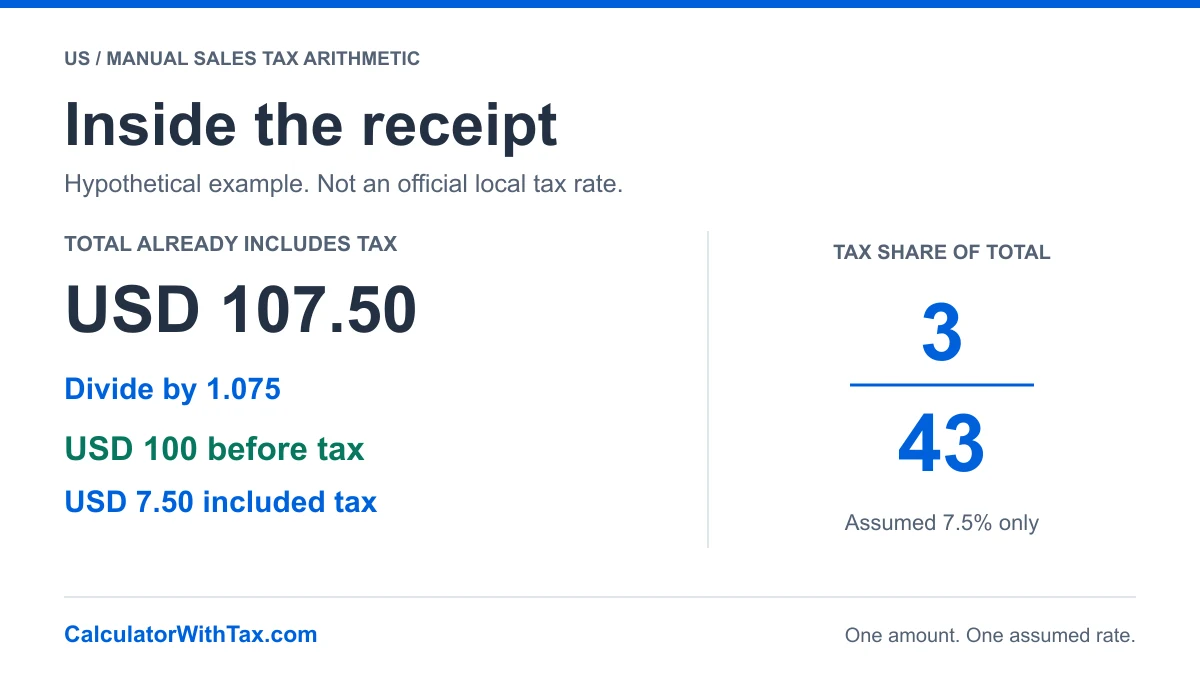
For an assumed 7.5%, the multiplier is 1.075. An illustrative USD 107.50 total divided by 1.075 gives USD 100 before tax. The difference is USD 7.50 included tax. No part of this example assigns a rate to a US state, address or product.
The equivalent unrounded tax fraction is the percentage divided by the sum of 100 and that percentage: rate / (100 + rate). At this explicitly assumed rate, 7.5 divided by 107.5 simplifies to 3/43. Multiplying USD 107.50 by that fraction gives USD 7.50. The fraction is a share of the inclusive total, not a new tax rate.
Receipt breakdown and worked examples
Every row uses the website's manual decimal engine. These percentages are hypothetical inputs, not official rates for any state, city or purchase.
| Scenario | Input | Assumed rate | Before tax | Tax | Total |
|---|---|---|---|---|---|
| A tax-inclusive receipt | $107.50 | 7.5% | $100.00 | $7.50 | $107.50 |
| A rounded receipt total | $21.49 | 7.5% | $19.99 | $1.50 | $21.49 |
| One confirmed rate and base | $135.00 | 8% | $125.00 | $10.00 | $135.00 |
The manual tool rounds the recovered before-tax amount to cents, with half-cents rounded up, then obtains tax by subtracting it from the entered total. This keeps the displayed components reconciled. It is not a universal US statutory rounding policy and may differ from a merchant’s line-level or component-level calculation.
For the illustrative USD 21.49 receipt at an assumed 7.5%, the tool recovers USD 19.99 before tax and USD 1.50 tax. The unrounded quotient contains more decimal places; displaying those extra digits as payable cents would not make the calculation more accurate for the receipt.
Why subtracting the percentage gives the wrong answer
The sales tax percentage applies to the amount before tax, not to the inclusive total. Subtracting the assumed 7.5% directly from USD 107.50 gives USD 99.4375 before rounding, rather than USD 100. That mistake removes 7.5% of a larger base.
For a simpler illustration, assume a hypothetical 10% and a USD 110 inclusive total. Division by 1.10 recovers USD 100. Subtracting 10% of USD 110 instead leaves USD 99. The one-dollar difference is caused by choosing the wrong base, not by rounding.
Use division when the total includes tax. Use multiplication when tax needs to be added to a before-tax amount. Switching calculator modes should follow the meaning of the input, not which result looks closest to a receipt.
A total alone does not reveal the rate
USD 110 can represent USD 100 plus an assumed 10% or USD 110 with no added tax. Other base-and-rate combinations are possible. Without another reliable input, the total is not enough to identify the tax rate or prove that a seller charged the wrong amount.
If you have both a separately identified taxable base and a tax amount, their ratio can be used as a mathematical cross-check. However, rounded cents, multiple tax components and mixed baskets can prevent that ratio from reproducing a published rate exactly. Do not round an inferred percentage and present it as an official jurisdiction rate.
Confirm the jurisdiction and isolate nonmatching amounts
Official rate selection is a separate step. The California tax authority’s rate page links an address lookup and explains district-tax additions. The Texas Comptroller’s local sales tax guidance distinguishes the state and local components. For other states, consult that jurisdiction’s own authority rather than reusing either example.
Do not enter an entire payment as one taxable total unless its contents fit the calculation. A receipt can include separate taxable and nontaxable amounts, more than one rate, or charges that require their own treatment. This guide does not determine the rules for shipping, discounts, gratuities or exemptions.
To illustrate the mathematical issue, suppose USD 107.50 is already established as one inclusive taxable amount at an assumed 7.5%, and USD 20 is separately established as outside that base. Reverse the USD 107.50 component, not the combined USD 127.50 payment. The result for that component is USD 100 before tax and USD 7.50 tax. This example does not classify any actual item as exempt.
Check what the result can and cannot establish
Verify the rate’s effective date and the transaction’s tax treatment before relying on the numbers. Confirm that the recovered before-tax amount plus the displayed tax equals the inclusive input. If you compare against a receipt, check the merchant’s item and tax breakdown before drawing conclusions from a one-cent difference.
The output is an arithmetic reconstruction under the tool’s stated convention. It is not an invoice-compliance certificate, a refund calculation, a filing instruction or a record of professional tax review. For a before-tax price instead of an inclusive amount, switch to Add tax and follow how to calculate sales tax.
Frequently asked questions
How does a reverse sales tax calculator work?
It divides an inclusive total by 1 plus the rate divided by 100 to recover the before-tax amount. The manual tool rounds that amount to cents and subtracts it from the total to display the included tax.
Why can't I subtract 7.5% from a tax-inclusive total?
The 7.5% was applied to the smaller before-tax amount. Taking 7.5% of the larger total removes too much. At an illustrative USD 107.50 total and assumed 7.5%, dividing by 1.075 gives USD 100 before tax and USD 7.50 tax.
Can I find the sales tax rate from the total alone?
No. Different before-tax amounts and rates can produce the same total. You need the applicable rate or a separately identified taxable base or tax amount, and any reconstruction must account for rounding and mixed tax treatments.
Can I reverse a receipt containing multiple rates?
Not reliably with one rate on the whole receipt. Separate the bases and rates first. Exempt items, tips, delivery and other charges can make the receipt total unsuitable for this one-base calculation.
Is reverse sales tax the same as a sales tax refund?
No. Reverse calculation is arithmetic that separates an inclusive amount. It does not establish a refund entitlement, exemption, registration obligation or tax-filing adjustment.
Manual example
Illustrative arithmetic only. Not an official tax rate.
- Amount before tax
- Tax amount
- Total
100.00 + 7.50 = 107.50
Open the full calculator